Cross-platform gamedev in WSL
You can use Ubuntu on WSL1 to develop, build, and test a game for Windows, Linux, and the browser.
WSL has a component (WSLg) that includes a Wayland compositor (Weston) and a XWayland server. This means that it can be used to run many Linux-native graphical apps.
I’ll be using the default Linux distro for WSL — Ubuntu — in this example, and the Ebitengine game engine for Go.
Set up the project
Ensure that Ubuntu on WSL is installed.
Start an Ubuntu session and install Go, which is easy with the snap:
sudo snap install go --classic
Make a Go project:
mkdir game && cd game
go mod init game
Write the code
Use a text editor pre-installed on Ubuntu to edit the game code:
vim main.go
# nano main.go
Paste this simple example, which bounces a ball around the window and changes the ball colour based on the build target:
package main

import (
	"fmt"
	"image/color"
	"log"
	"runtime"

	"github.com/hajimehoshi/ebiten/v2"
	"github.com/hajimehoshi/ebiten/v2/ebitenutil"
	"github.com/hajimehoshi/ebiten/v2/vector"
)

const (
	screenW    = 480
	screenH    = 360
	ballRadius = 12
	textPadX   = 8
	textPadY   = 8
)

var label = fmt.Sprintf("This is a %s build", runtime.GOOS)

func ballColor() color.Color {
	switch runtime.GOOS {
	case "linux":
		return color.RGBA{R: 255, G: 0, B: 0, A: 255}
	case "windows":
		return color.RGBA{R: 0, G: 0, B: 255, A: 255}
	case "js":
		return color.RGBA{R: 0, G: 255, B: 0, A: 255}
	default:
		return color.White
	}
}

type Game struct {
	x, y   float64
	vx, vy float64
}

func (g *Game) Update() error {

	g.x += g.vx
	g.y += g.vy

	if g.x-ballRadius <= 0 || g.x+ballRadius >= screenW {
		g.vx = -g.vx
	} else if g.y-ballRadius <= 0 || g.y+ballRadius >= screenH {
		g.vy = -g.vy
	}

	return nil
}

func (g *Game) Draw(screen *ebiten.Image) {
	screen.Fill(color.Black)
	ebitenutil.DebugPrintAt(screen, label, textPadX, textPadY)
	vector.DrawFilledCircle(screen, float32(g.x), float32(g.y), ballRadius, ballColor(), true)
}

func (g *Game) Layout(_, _ int) (int, int) {
	return screenW, screenH
}

func main() {
	ebiten.SetWindowSize(screenW, screenH)
	ebiten.SetWindowTitle("Crossplatform builds in WSL")
	log.Fatal(ebiten.RunGame(&Game{x: 40, y: 40, vx: 4, vy: 2.5}))
}
Make sure to resolve the Go dependencies with go mod tidy.
Build cross-platform
You can build for Windows right away:
GOOS=windows GOARCH=amd64 go build .
To build for Linux, first install dependencies that are required to compile the game for X11:
sudo apt update

sudo apt install \
        libx11-dev \
        libxrandr-dev \
        libxcursor-dev \
        libxinerama-dev \
        libxi-dev \
        libxxf86vm-dev \
        libgl1-mesa-dev \
        xorg-dev
Then build for Linux:
GOOS=linux GOARCH=amd64 go build .
To build for WASM, run:
GOOS=js GOARCH=wasm go build -o game.wasm .
Next, copy wasm_exec.js to the current directory so that the WebAssembly
binary can be executed:
# note: exact location depends on your Go version
cp $(go env GOROOT)/misc/wasm/wasm_exec.js .
Finally, create two html files, one that includes the game (game.html) and the other
that embeds the game in an iframe (index.html).
Game:
<!DOCTYPE html>
<script src="wasm_exec.js"></script>
<script>
  const go = new Go();
  WebAssembly.instantiateStreaming(fetch("game.wasm"), go.importObject).then(r => go.run(r.instance));
</script>
Embedder:
<!DOCTYPE html>
<style>
  body { margin: 0; background: #555; display: flex; justify-content: center; align-items: center; height: 100vh; overflow: hidden; }
</style>
<iframe src="game.html" width="480" height="360" frameborder="0"></iframe>
Run the builds
You now have three builds of your game for different platforms.
In one Ubuntu session, run the Windows game:
./game.exe
In another, run the Linux game:
./game
Finally, to run the game in a browser, create a simple Python server to serve to localhost:
python3 -m http.server -b localhost
Then ctrl+left click on the link that appears in the terminal (http://127.0.0.1:8000/).
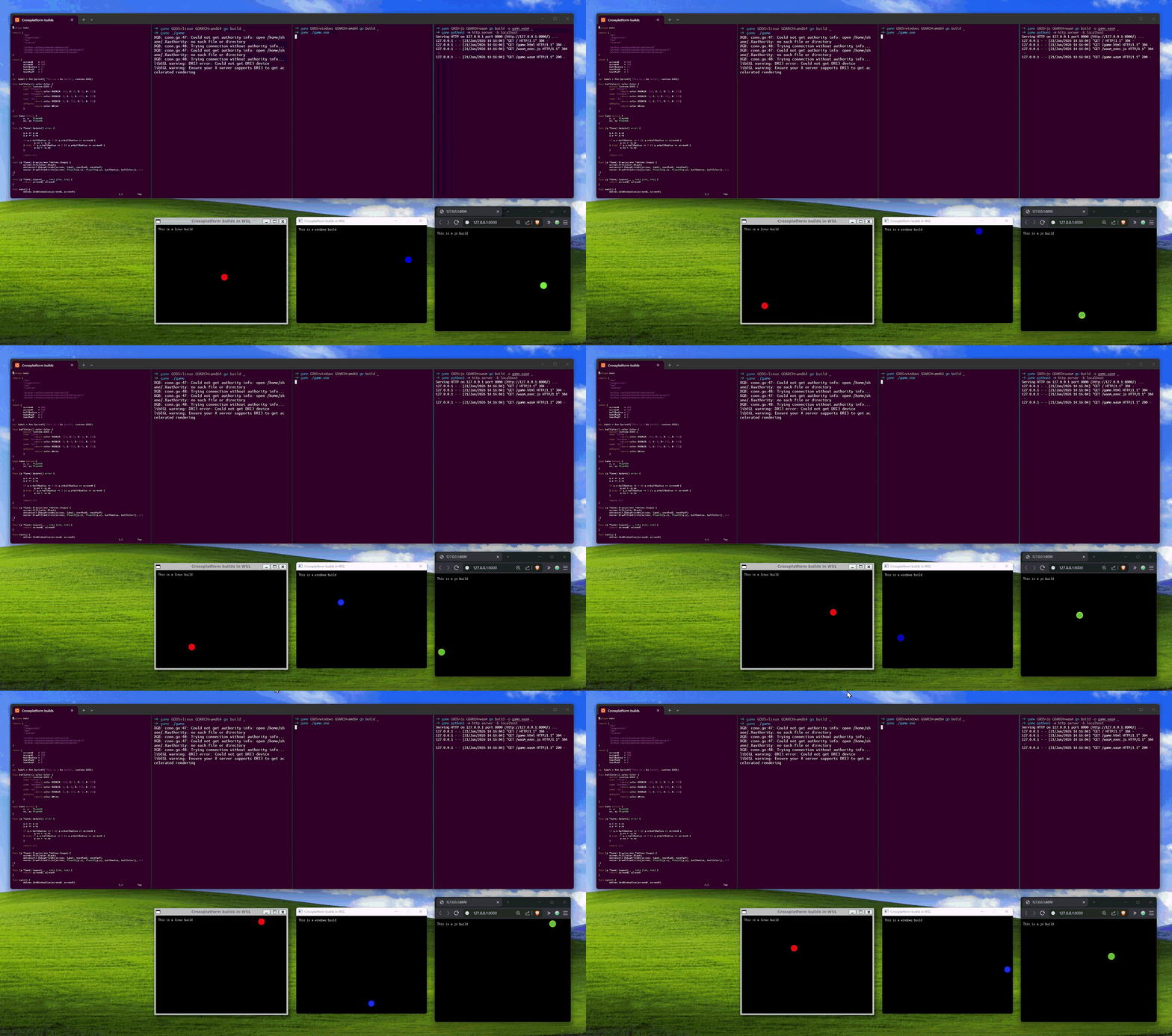
In the GIF below, you can see all builds running from WSL in my Windows machine. The ball is a different colour depending on the platform:
- Red: Linux
- Blue: Windows
- Green: web
Summary of conveniences
- WSL: quick setup of a Linux development environment on Windows
- Ubuntu: editors and Python are pre-installed, Go is just a
snap installaway - Go: easy cross compilation to multiple platforms
- Ebitengine: no complex setup, just import the engine and start coding
Full disclosure: I work on the team who develops and maintains Ubuntu on WSL.